Making decisions
Twelve minutes. You will build a health check that calls an API and reports something different depending on what came back. This is the tutorial where flows stop being a straight line.
What you need
- Tutorial 2 finished
The flow you are building
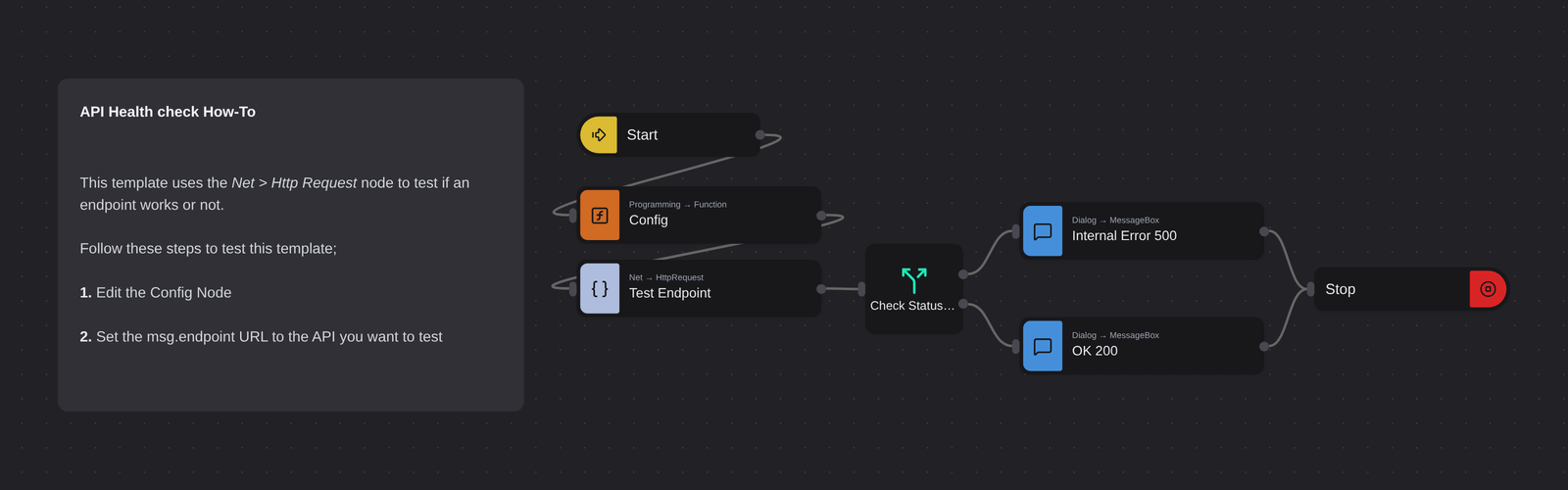
Notice the shape. Up to now every flow was one line; this one forks at Check Status Code and rejoins at Stop.
Why branching is the point
An automation that always does the same five things is a macro. What makes RPA useful is that a robot can look at what it found and choose — post the invoice or route it for review, retry or give up, continue or raise an alert.
Robomotion gives you a few ways to branch:
| Node | Use it for |
|---|---|
| Switch (Programming → Switch) | Choosing between paths. One output port per condition. |
| Go To and Label (Flow) | Jumping to a named point instead of forking — see Go to Label. |
| Fork Branch (Flow → Fork Branch) | Running several branches at once — parallelism, not a decision. |
If you have used other automation tools you will go looking for one. Robomotion does not have
it — Switch does that job. For a plain true/false test, give Switch two conditions: your
test, then true as a catch-all, with Break enabled. Port 1 is the "then", port 2 is the
"else".
A single-condition Switch works too, but when the condition is false it raises an error rather than doing nothing — see what happens when nothing matches.
This tutorial uses Switch, because HTTP status codes are exactly the case it is for.
Build it
-
Create a project named
API Health Check. -
Add Inject (rename
Start), Function (renameConfig) and HTTP Request (renameTest Endpoint), connected in that order — the same opening as tutorial 1. -
Edit Config:
// The API endpoint to checkmsg.endpoint = "https://api.robomotion.io/version";return msg; -
Select Test Endpoint and set:
Property Value Method GETURL Message → endpointCustom Headers Content-Type:application/json -
Add a Switch node (Programming → Switch), rename it
Check Status Code, and connectTest Endpointinto it. Give it two conditions:msg.respStatus === 500msg.respStatus === 200The node now has two output ports — one per condition, in order. Port 1 fires when the first condition is true, port 2 when the second is.
Leave Break unchecked for now. It makes no difference here, because a response cannot be both 500 and 200 — but it matters as soon as two conditions can be true at once, and it is what turns a Switch into an if/else-if chain. With Break on, evaluation stops at the first match; with it off, every matching port fires.
Where respStatus comes fromTest Endpointwrites the HTTP status code intomsg.respStatusalongside the body inmsg.resp. Add a Debug node after it if you want to see the whole message — the habit from tutorial 2 pays off here. -
Add two Message Box nodes:
Rename to Title Text Type Internal Error 500Custom → Test EndpointCustom → FailederrorOK 200Custom → Test EndpointCustom → Everything is OKdefault -
Wire the branches:
- Switch port 1 →
Internal Error 500 - Switch port 2 →
OK 200
- Switch port 1 →
-
Add a Stop node and connect both message boxes into it.
Both branches converging on one
Stopis deliberate. Whichever way execution went, the flow ends in one place — so if you later add cleanup, there is one obvious spot for it. -
Save and run. The endpoint is healthy, so you get Everything is OK.
Make it take the other branch
The interesting half is the failure path, and you should always test it.
Change Config to point at a URL that returns a 500 — for example
https://httpstat.us/500 — and run again. Now the error dialog appears.
This is worth doing every time you build a branch. A branch you have never executed is a branch you have not tested, and the failure path is the one that matters at three in the morning.
What happens when nothing matches
Point msg.endpoint at something returning 404 and run it. Neither condition is true, and
Switch stops the flow with an error: no matching condition.
That is deliberate — a branch that silently swallows input nobody anticipated is far harder to debug than one that stops and says so. But an error at three in the morning is not what you want either, so handle the case explicitly. Three ways:
- Add a final catch-all condition,
true, wired to a "something unexpected" branch — and enable Break, or the catch-all will fire on every message alongside the real match. - Or make the last condition the general case, for example
msg.respStatus >= 400. - Or let it error and catch it with a Catch node.
Getting into the habit of asking "what does this do when none of my cases hold?" will save you more debugging than any other single thing.
Try changing it
- Add a third branch for
msg.respStatus === 401with its own message. - Replace the message boxes with a Mail node, and you have a monitor that emails you. Add a Schedule and it runs every five minutes without you.
Next
Repeating work → — doing this to a hundred endpoints instead of one.