Versions and Publishing
A flow you are editing is the master working copy. A version is a frozen snapshot of it with a name. Publishing is something you do to a version — which is why versioning and publishing are one screen rather than two.
The version selector sits in the top bar, next to the project name:

It shows which version the canvas is on. master means you are editing the live working copy.
Version Control
Clicking it opens Version Control:
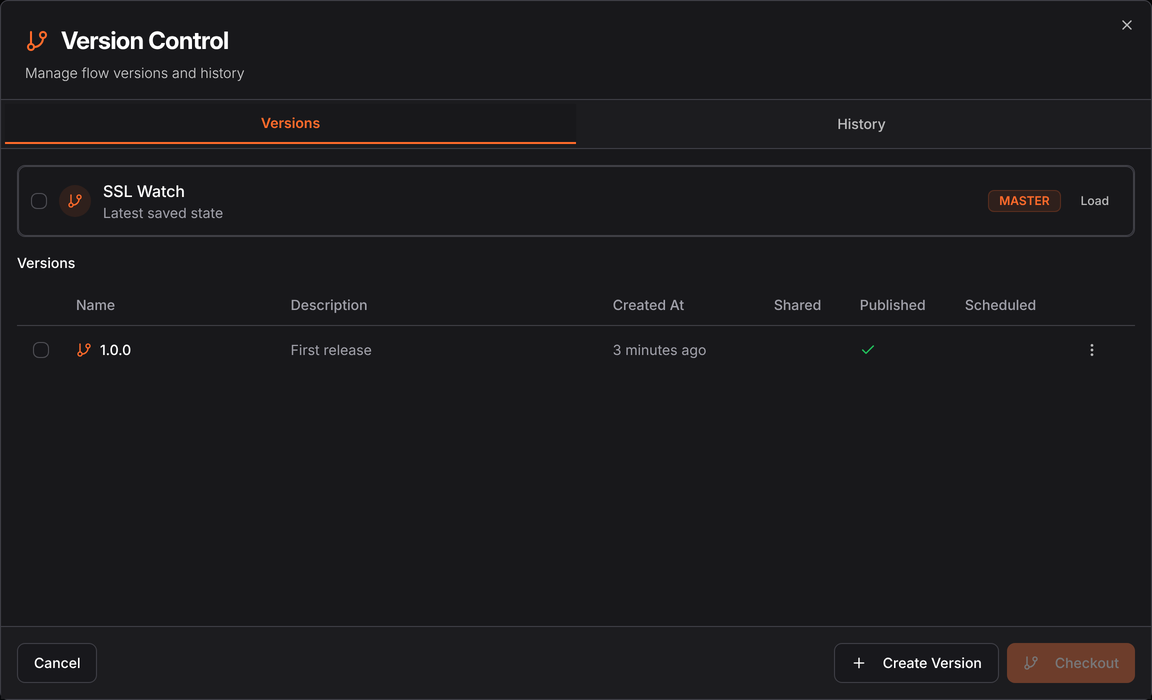
The row at the top is the working copy — "Latest saved state", tagged MASTER. Below it is every version you have cut, with four columns that answer the question people actually have:
| Column | Meaning |
|---|---|
| Shared | This version is shared with others |
| Published | Available to schedules, triggers and the API |
| Scheduled | A schedule is currently running it |
| Created At | When it was frozen |
That Published tick is the whole publish story. There is no separate publish screen.
Creating a version
Create Version freezes the current state under a name and description. Name it something
you will recognise in a schedule six months from now — 1.0.0, or before-vat-change.
A version is immutable. Keep editing master and the version stays as it was, which is the
point: a schedule pinned to 1.0.0 keeps running 1.0.0 while you work on the next one.
Publishing
Publishing makes a version available to everything outside the Designer — schedules, triggers, Cloud Run, and the API. An unpublished flow can only be run by hand from the Designer.
Published flows are listed in Admin Console → Published Flows, which is where you schedule and manage them.
Checkout
Checkout loads an old version onto the canvas so you can look at it, or go back to it. The History tab beside Versions shows the commit history behind the flow — every Save is a commit.
Tick the checkboxes on two rows and Checkout becomes Compare, which opens Visual Diff: both versions on one canvas, with added, removed and changed nodes picked out. It is the fastest way to answer "what changed between the version that worked and this one".
The cheapest insurance in the product. Cut a version before editing a flow that is scheduled, and rolling back is a checkout rather than an archaeology exercise.
See also
- Published Flows — scheduling and managing them
- History — the change history behind a flow
- Schedules — running a published version on a timer